
User Interface
The SolidGroundUX user-interface layer provides a consistent vocabulary for terminal output and interaction. It separates what an application wants to communicate from the details of ANSI styling, terminal width, glyph selection, prompt handling, and output policy.
Applications should normally use the public UI functions rather than assembling escape sequences, labels, prompts, or status messages themselves. This keeps scripts visually consistent and allows presentation rules to evolve without requiring application code to be rewritten.
UI Architecture
The UI group is divided into small layers with distinct responsibilities:
-
ui-glyphs.sh— Shared symbols, separators, arrows, and fallback characters -ui.sh— Core rendering, colors, themes, widths, title bars, sections, and values -ui-say.sh— Message semantics, log-level filtering, console output, and file logging -ui-ask.sh— Typed prompts, choices, validation, forms, and direct terminal input -ui-dlg.sh— Higher-level decisions and dialog-oriented interaction flows
The lower layers do not depend on application-specific behavior. Higher layers build on the rendering and input primitives below them. This keeps formatting, messaging, and interaction concerns separate while still presenting one coherent interface to applications.
Rendering and Layout
The rendering layer in
ui.shprovides reusable functions for structured console output. It handles visible string length, ANSI-aware padding, terminal width, themes, foreground and background colors, text attributes, title bars, section headers, filled lines, labeled values, and formatted cells.
Width-sensitive functions use visible character length rather than raw byte length wherever possible. ANSI control sequences therefore do not disturb label alignment or layout calculations.
Frequently used rendering functions include:
-
sgnd_print_titlebar-sgnd_print_sectionheader-sgnd_print_labeledvalue-sgnd_print_fill-sgnd_print-sgnd_print_single-sgnd_print_file-sgnd_print_cell
Application code should prefer these helpers over local
printfformatting when the output represents a standard SolidGroundUX UI element.
Themes, Palettes, and Run Modes
Styling is resolved centrally. Palettes define named colors and visual roles, while themes determine how those roles are applied by the rendering functions. This prevents consuming scripts from embedding ANSI codes or hard-coded color choices. DataTable rendering has separate theme defaults for header rules (
SGND_DT_HEADERLINE_CLR), column headings (SGND_DT_COLUMNNAME_CLR), and data text (SGND_DT_DATACOLOR_CLR). Callers can still pass explicit header and data colors when printing a particular table.
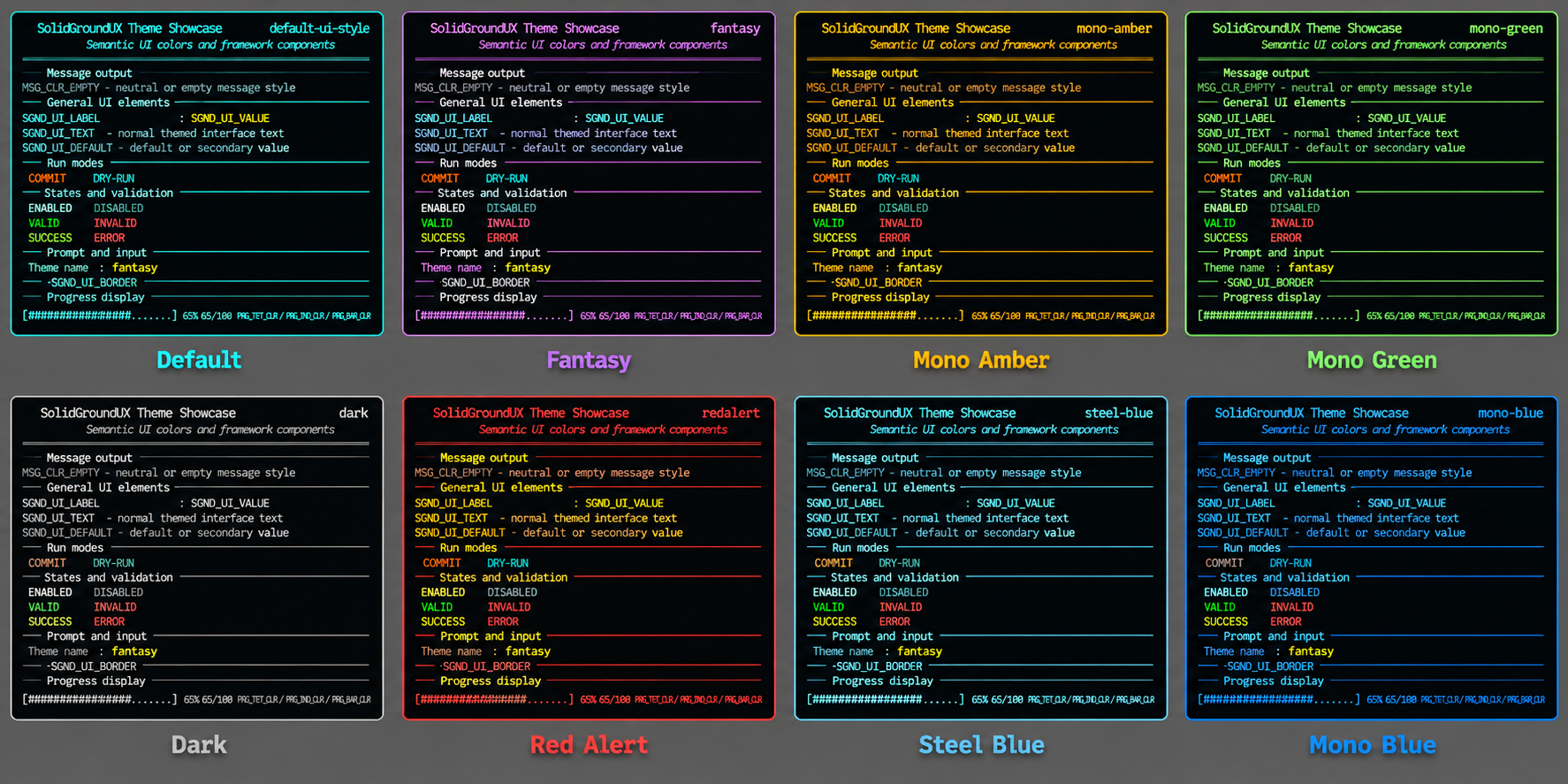
The active style can reflect the current run mode, such as normal operation, dry-run execution, debugging, or another framework-defined state. Applications communicate intent through the public API; the UI layer selects the appropriate visual representation.
When styling is disabled or unsupported, UI functions should degrade to readable plain text without changing the semantic content of the output.
Messages and Logging
The messaging layer in
ui-say.shprovides the standard way for scripts to emit informational, successful, warning, error, debug, and progress-related messages. Message type, log level, console visibility, and optional file logging are handled independently from the application logic that produced the message.
This distinction is important: an application chooses the meaning and severity of a message, while the framework decides whether and how that message is displayed or recorded.
Scripts should therefore use the
sayfamily consistently instead of mixing direct output with framework messages. Directprintfremains appropriate for machine-readable output or for narrowly controlled rendering inside the UI implementation itself.
Prompts and User Input
The prompt layer in
ui-ask.shprovides interactive input without assuming that standard input is available. Where necessary, prompts read from the controlling terminal so that applications can still process redirected or piped input.
The public prompt API supports labeled input, editable defaults, validation, constrained decisions, timed continuation, immediate key choices, and small field-driven forms.
Principal functions include:
-
ask-ask_decision-ask_dlg_autocontinue-ask_choose-ask_choose_immediate-ask_prompt_form
Prompt functions normalize common interaction patterns so applications do not need to reproduce terminal handling, label formatting, default-value behavior, or response validation. Use
ask_decisionfor an explicit user decision that should block until a choice is made. Useask_dlg_autocontinuefor an interruptible timed continuation where the normal path continues automatically but the operator may intervene, pause, redo, or cancel according to the options supplied. These are distinct interaction patterns.
Dialog-Oriented Interaction
The dialog layer in
ui-dlg.shbuilds structured decisions on top of the lower prompt primitives. It expands symbolic choices, displays available actions, normalizes keyboard input, translates dialog return codes, and supports timed auto-continue behavior.
These helpers are intentionally lightweight. They provide predictable interaction patterns for shell applications without introducing a full-screen terminal user interface or a separate workflow engine.
Glyphs and Character Fallbacks
ui-glyphs.shcentralizes the visual symbols used throughout the framework. Keeping glyphs in one place avoids repeated literal Unicode characters and makes it possible to provide simpler fallbacks for restricted terminals.
Rendering code should refer to the shared glyph definitions rather than choosing local arrows, checkmarks, separators, or box-drawing characters. This preserves a recognizable visual language across the framework.
Rendering Width and Message Routing
Width-aware UI primitives derive their default width from the active terminal. An explicit
--maxwidthis honored when supplied, andSGND_MAX_RENDER_WIDTHacts as an optional global cap; an unset or zero cap allows use of the full terminal width.
The
say*family routes semantic messages independently to console and file output.SGND_CONSOLE_LOG_LEVELcontrols terminal visibility andSGND_FILE_LOG_LEVELcontrols persistent logging, allowing the two audiences to use different detail levels.
Guidance for Applications
A SolidGroundUX application should generally follow these rules:
- Use
sayfunctions for user-facing status and diagnostic messages. - Use rendering helpers for standard titles, sections, labels, and tables. - Use prompt and dialog helpers for interactive decisions. - Do not embed ANSI escape sequences in application code. - Do not duplicate glyphs or terminal-width calculations locally. - Keep machine-readable output separate from styled human-readable output. - Respect non-interactive, quiet, debug, and dry-run execution modes.
Following these conventions gives command-line tools a shared appearance and, more importantly, shared behavior. Users can learn one interaction model and apply it across all SolidGroundUX applications.
Scope and Non-Goals
The UI framework is designed for structured command-line applications. It is not intended to be a full-screen TUI toolkit, a graphical interface, or a replacement for dedicated terminal-layout libraries.
Its goal is deliberately narrower: provide dependable, composable primitives for readable output, consistent messaging, and predictable interaction in Bash.