
Bootstrap
Bootstrap turns a small executable entry point into a fully initialized SolidGroundUX runtime. Version 2.1 distinguishes the executable's contextual root from the location used to resolve Framework-owned resources. That distinction is what allows SDK and MCM development trees to use an installed Framework cleanly.
Bootstrap Sequence
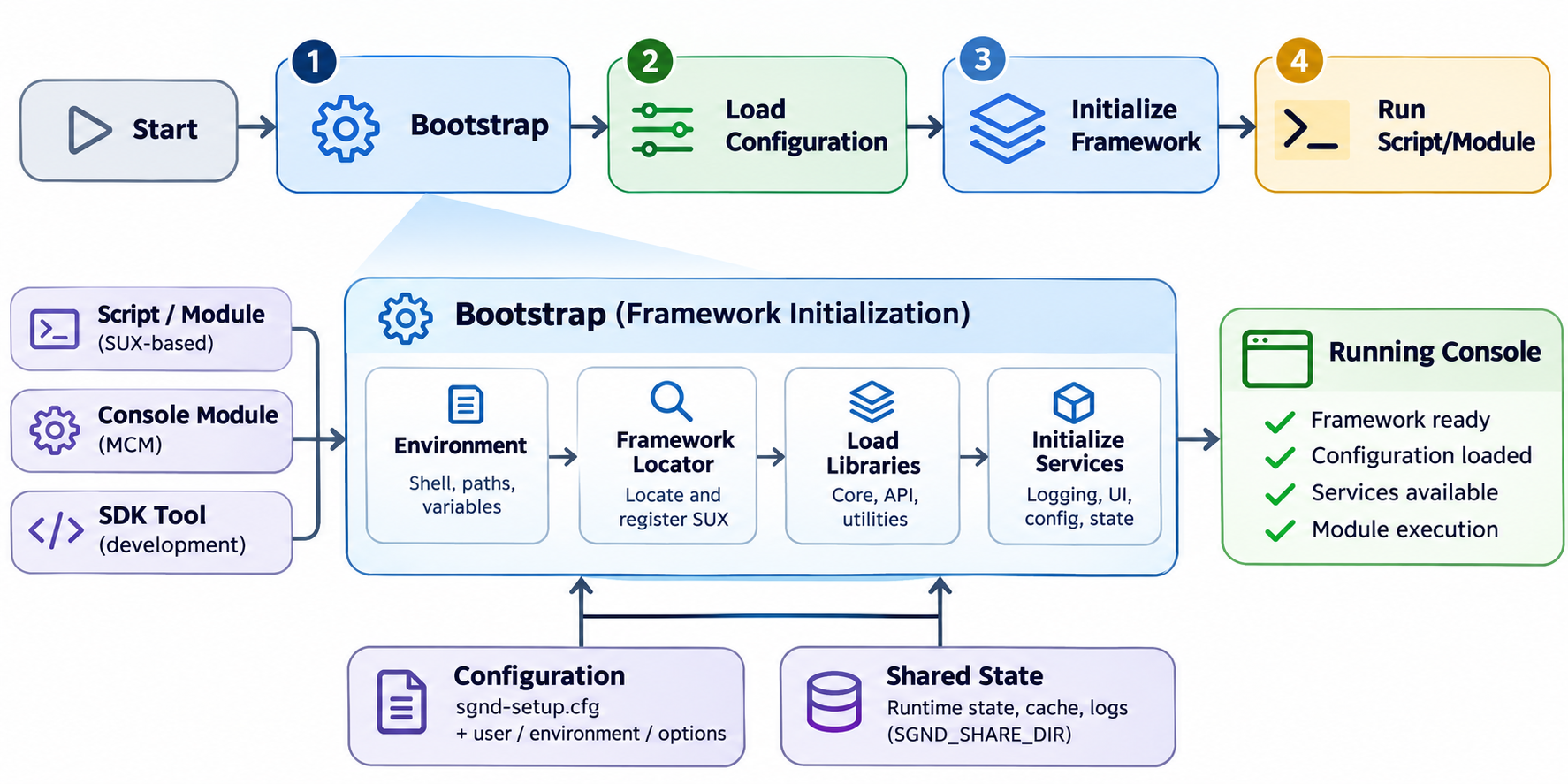
Startup proceeds in this order:
executable
    -> _framework_locator
    -> sgnd-exe-common
    -> sgnd-bootstrap
    -> bootstrap environment
    -> configuration and state
    -> libraries declared in SGND_USING
    -> application main
_framework_locatoris intentionally self-contained. It runs before the normal Framework libraries are available and locatessgnd-exe-common.sh. The executable common layer then provides the early runtime needed to entersgnd-bootstrap.
Bootstrap Environment
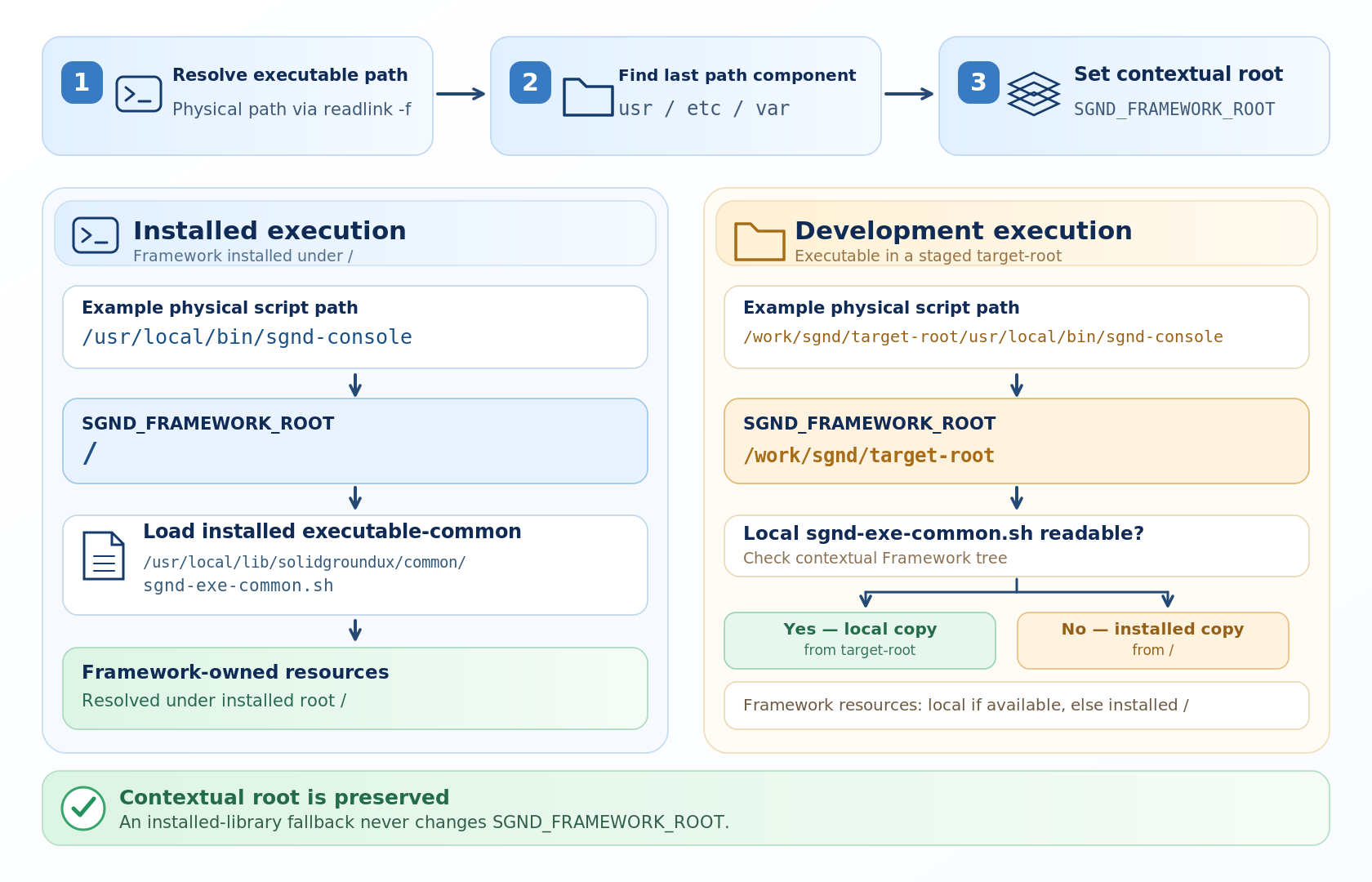
SGND_FRAMEWORK_ROOTis the contextual root of the executing tree. In an installed execution it is normally/; in a development execution it normally identifies the repositorytarget-root.
A contextual root is not automatically a Framework root. When Framework-owned files are required,
sgnd_framework_resolve_pathchecks whether the contextual tree really contains the Framework. If it does, local Framework resources take precedence with installed/as fallback. If it does not, resources resolve directly from the installed Framework.
This leaves application/project configuration and state semantics intact while preventing SDK or MCM development directories from masquerading as Framework trees.
Automatic Library Loading
SolidGroundUX uses a dependency declaration mechanism to determine which libraries should be available to a script.
Scripts can populate
SGND_USINGto declare framework libraries they depend on. During bootstrap, the framework resolves these entries and sources the required files automatically.
This keeps executable scripts smaller and makes dependencies explicit near the top of the file. Instead of scattering
sourcestatements throughout the script, the script declares what it needs and lets the bootstrap layer perform the actual loading.
Core libraries needed by bootstrap are loaded automatically. Project definitions are sourced explicitly as foundational globals rather than through
SGND_USING; additional libraries are then loaded from the script's declared requirements.
Global Definitions
The bootstrap process also prepares common SolidGroundUX global variables.
These globals describe the runtime environment and provide shared values used by other framework components. They may include resolved paths, script metadata, runtime flags, configuration locations, and other common settings.
Configurable values are described through the current scoped registries. Framework settings use
SGND_FRAMEWORK_GLOBALS; application settings useSGND_SCRIPT_GLOBALS; runtime definitions and defaults are supplied by the bootstrap/environment layer. These registries bridge static defaults, system/user configuration files, runtime state, and command-line overrides without requiring each executable to implement its own configuration model.
Configuration Management
Configuration handling is integrated into the bootstrap lifecycle.
When configuration-related globals are available, the framework can initialize configuration metadata, determine expected configuration files, load values, and apply them before the main application logic runs.
This means a script can define the values it cares about, while the framework handles the repetitive work of loading, overriding, and exposing those values.
The result is a consistent configuration model across scripts without requiring every executable to implement its own configuration parser.
Transferable Framework State
Every executable bootstraps its own SolidGroundUX framework instance. Ordinary shell globals therefore remain local to that process and are not automatically shared with executables started from it.
SolidGroundUX preserves selected user-level runtime choices through a transferable framework state file. The file is identified by
SGND_FRAMEWORK_STATEFILEand is normally resolved as:
$SGND_USRCFG_DIR/framework.state
After the normal framework configuration has been loaded, bootstrap recalculates this filename from the effective user configuration directory. If the file exists, the variables listed in
SGND_FRAMEWORK_STATEare loaded from it. If it does not exist, bootstrap creates it from the current effective values.
The framework state is applied before the UI palette and style are loaded. This allows a theme or logging choice changed by one SolidGroundUX executable to be used by subsequently started executables, even though each executable creates its own framework instance.
Only explicitly listed variables are transferable. Process-specific values such as script metadata, progress state, start times, and application-local state remain private to the current executable. The framework state file is therefore a small runtime overlay, not a dump of all framework globals and not a replacement for the normal system and user configuration files.
The current transferable set is maintained in
SGND_FRAMEWORK_STATEand includes the active console and file log levels, UI style and palette, and the date format used bysay()output. Runtime functions that change one of these settings should update the framework state file when the change must remain visible to later framework instances.
Console and File Log Levels
Console output and logfile output are controlled independently.
SGND_CONSOLE_LOG_LEVELcontrols whichsay()messages are rendered to the terminal.SGND_FILE_LOG_LEVELcontrols which messages are appended to the resolved logfile. Both settings support the levels:
silent, quiet, normal, verbose, debug, trace
A message can therefore be suppressed on screen while still being recorded in the logfile, or displayed on screen while file logging is effectively disabled. Setting
SGND_FILE_LOG_LEVELtosilentdisables logfile output without requiring a separate enable flag.
say()evaluates the console and file thresholds separately. Matching logfile entries are always written with a date/time prefix usingSAY_DATE_FORMAT, regardless of whether timestamps are currently shown on the console.
The active log levels are part of
SGND_FRAMEWORK_STATE, so changes saved during one framework instance become the starting values for later SolidGroundUX executables run by the same user.
Built-in Arguments
Bootstrapped executables receive a set of framework-provided command-line arguments.
These built-in options cover common framework behavior such as help output, version information, diagnostic output, tracing or debugging behavior, and configuration-related overrides.
Application-specific arguments can be added by the executable itself, but common framework behavior remains standardized across all bootstrapped tools. Framework-provided and application-specific arguments may be freely intermixed on the command line. Bootstrap extracts recognized framework builtins while preserving application-specific options and positional values in their original order for the later script-level parse. Argument meaning therefore does not depend on whether a builtin appears before, between, or after application-specific options. The standard
--marker is an absolute end-of-options boundary. Once encountered, everything following it is preserved as positional data, even when a following value happens to resemble a framework or application option. Script-specific command-line values are applied after script configuration and state have been loaded. Explicit command-line values can therefore override stored or configured script values while framework builtins remain available independently of their position on the command line.
This gives SolidGroundUX applications a shared command-line personality: once a user understands the standard options for one tool, the same expectations apply to the others.
Relationship to the Executable Template
The executable template contains the preferred bootstrap structure for new command-line tools.
When creating a new SolidGroundUX executable, start from the template rather than copying bootstrap code from an existing script by hand. Existing scripts may contain historical details, local deviations, or project-specific behavior, while the template represents the current intended pattern.
In practical terms, the template shows where to declare dependencies, where to define globals, where to register custom arguments, and where application logic begins after bootstrap has completed.
Why Bootstrap Matters
The bootstrap layer exists to keep scripts boring in the best possible way.
A bootstrapped executable does not need to rediscover the framework, reimplement argument parsing, manually source every common library, or invent its own configuration lifecycle.
That work is centralized once, tested once, and reused everywhere.
This is one of the main reasons SolidGroundUX behaves like a framework rather than a collection of unrelated Bash helpers.