
Relationship to website publication
This page covers the first, source-to-Markdown workflow only. Documentation bundles end at an authored Markdown repository; they do not render or deploy HTML. See the Web Content Management overview for how this output may enter the independent website-generation process.
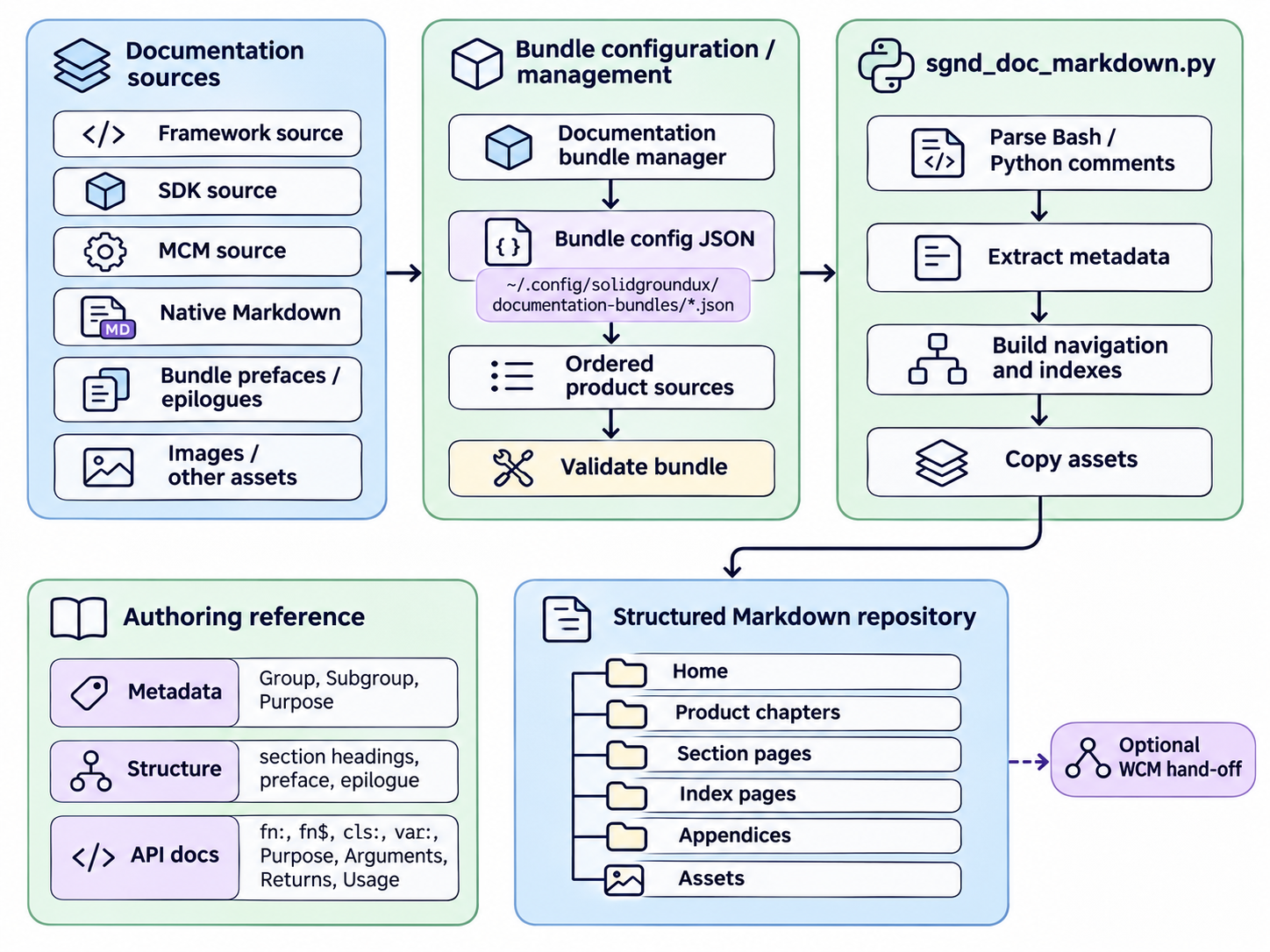
Bundle Management
The manage-bundles.sh menu lets you create, select, configure, validate and delete bundles. Its source-management menu adds, edits, reorders and removes product chapters without changing their underlying repositories.
Bundle configuration is persisted as JSON beneath ~/.config/solidgroundux/documentation-bundles/. The Python bundle manager (sgnd_doc_bundles.py) validates identifiers and paths, and writes changes atomically. Validation checks that chapter sources exist and the output directory is absolute and outside the source repositories.
A bundle can contain introductory and closing documents, either automatically discovered by naming convention or explicitly selected from any source repository. Bundle-specific bundle-id_preface / bundle-id_epilogue sources take precedence over generic bundle_preface / bundle_epilogue files. Explicit lists take precedence over automatic discovery, including when intentionally empty. Bundle prefaces appear before product chapters; bundle epilogues appear after the products and before appendices.
Ordinary .md source files are copied unchanged when explicitly selected. Their navigation placement is stored separately, without editing their front matter. Each source document appears only once in the bundle. Older saved Chapter 0 selections remain readable and are mapped back to the source preface on generation when possible.
Markdown generation
sgnd_doc_markdown.py scans configured Bash and Python sources, their metadata, native Python docstrings, explicit documentation declarations and selected bundle prefaces/epilogues. It writes a structured Markdown repository with navigation, reference pages, indexes and copied assets.
Authoring reference
Use the following source-comment constructs. The examples show what belongs in the source file, not what a user types into the Management Console.
| Construct / code block | Function | Example in source |
|---|---|---|
Group, Subgroup | Places the file in the documentation hierarchy | # Group : Modules |
# - / # -- / # --- | Introduces source documentation sections at successive levels | # -- Validation ------- |
# fn: | Declares a documented function or method | # fn: sgnd_example |
# fn$ | Marks reusable template function documentation; reserved for the framework-locator template in production scripts | # fn$ _framework_locator |
# cls: | Documents a class | # cls: Client |
# var: | Documents a variable | # var: SGND_CONFIG_DIR |
# doc: | Names a general documentation declaration | # doc: Overview |
# . Purpose | Describes the responsibility of a function | # . Purpose |
# . Arguments | Documents accepted inputs using lists | # - $1: Source directory |
# . Returns | States the status or result when relevant | # - 0: Successful operation |
# . Usage | Introduces at least one executable example | # . Usage |
| Fenced code block | Preserves indentation and adds a language label | ` `bash or `python ` |
| Markdown table | Presents related values in rows and columns | ` |
| Markdown list | Keeps options as separate rendered lines | - --force: Overwrite output |
| Image reference | Includes an image copied from documentation assets |  |
# def: / # def$ | Delimits source definitions rendered as structured tables | # def: Palette ... # def$ |
Canonical function header with meaningful usage
# fn: sgnd_example
# . Purpose
#   Validate a supplied output directory before creating files.
# . Arguments
#   - $1: Output directory, required.
# . Returns
#   - 0: Directory is suitable; non-zero otherwise.
# . Usage
#   ```bash
#   sgnd_example "/tmp/site-output"
#   ```
The example is illustrative: sgnd_example is not an installed public API. Every real Usage example must match the function's signature and behavior. Bash comments use the # fn: / # . convention; Python additionally accepts native module, class and function docstrings. Public declarations receive detailed pages; internal implementations appear in concise summaries.
Module metadata and attribution
Header metadata (Version, Build, Source, Type, Group, Subgroup and Purpose) identifies the documented source and its location in navigation. Attribution records ownership and licensing. Keep both accurate and update them when the source changes.
Images and assets
Reference assets using ordinary Markdown image syntax; store assets in the product documentation resources or other configured asset directories. The generator copies the images into the output repository, checks missing images, and rejects conflicting contents mapped to the same destination filename. Use relevant, verified diagrams rather than illustrations based on obsolete architecture. The generated documentation can be reviewed as Markdown before it is submitted to the website builder.
Generated Output
The bundle generator writes Markdown pages, chapter and section indexes, navigation metadata and referenced assets beneath the configured output root. It also incorporates available product reference documents such as release notes, README, license and changelog into appendix content.
The generated Markdown can be inspected locally or passed to the WCM static-site generator. HTML layout, theme rendering and website deployment are WCM concerns; they do not belong to the bundle-managing Python CLI.
Prefaces and Epilogues
Documentation-only sources can provide introductory or closing content for a product, group, or subgroup. Prefaces and epilogues intentionally behave differently in the generated hierarchy.
A normal preface supplies the content of the hierarchy node itself. Selecting the product, group, or subgroup therefore opens its introductory page directly instead of first navigating to a separate child named "Preface". This makes authored introduction material act as the landing page for the section it explains.
A Page preface is a separately navigable child page and appears before normal source-code entries in the section. An epilogue remains a trailing child page It is emitted after the normal children and is appropriate for closing notes, consolidated reference material, migration guidance, or other content that genuinely belongs at the end of a section.
The role is primarily selected by the Metadata Purpose value:
Product preface <> Product-node content Product epilogue <> Final child beneath the product Group preface <> Group-node content Group epilogue <> Final child beneath the named Group Subgroup preface <> Subgroup-node content Subgroup epilogue <> Final child beneath the named Subgroup Page preface <> Named child documentation page beneath the Group/Subgroup
Group and Subgroup metadata determine where group- and subgroup-level sources belong. Product-level sources belong directly to their product. Prefaces therefore affect the parent node's content reference; epilogues affect child ordering.
Filename recognition is also supported as a compatibility fallback. The generator recognizes conventional names based on the product, group, or subgroup name followed by a preface or epilogue suffix. Names are normalized for matching, so hyphens, spaces, and underscores in the logical name do not define the hierarchy themselves.
New documentation sources should make the role explicit through Purpose rather than relying on filename inference. This keeps placement independent of the physical doc-sources filename and leaves Group and Subgroup metadata as the authoritative description of where the content belongs.
Add prefaces and epilogues only when they improve the reader's path. A preface is useful when a section needs context, boundaries, a mental model, or a short guide to its children. An epilogue is useful when material is more valuable after those children have been read. Neither should be added merely to increase page count.
Example group preface metadata:
Group : Deployment Purpose : Group preface
Example subgroup epilogue metadata:
Group : Web Content Manager Subgroup : Documentation Generator Purpose : Subgroup epilogue
Documentation Conventions
Documentation comments should be written as part of normal development, not as an afterthought at release time.
Module headers should be kept complete and current.
Public functions should include enough information for another developer to understand their purpose, expected inputs, output, return behavior, and typical usage.
Internal helpers may use shorter documentation, but should still explain intent when the behavior is not obvious.
Empty documentation separator lines should use a plain comment line rather than a quoted documentation line, to avoid stray quote markers in rendered output.
Why Source-Based Documentation
Script-heavy projects are especially vulnerable to documentation drift. Bash and Python source files are easy to change quickly, and separate documentation is easy to forget.
SolidGroundUX avoids this by treating source comments as the primary documentation source.
This does not remove the need for prose, examples, or architectural explanation, but it does make the reference documentation much more likely to stay close to the implementation.