
SolidGround Management Console
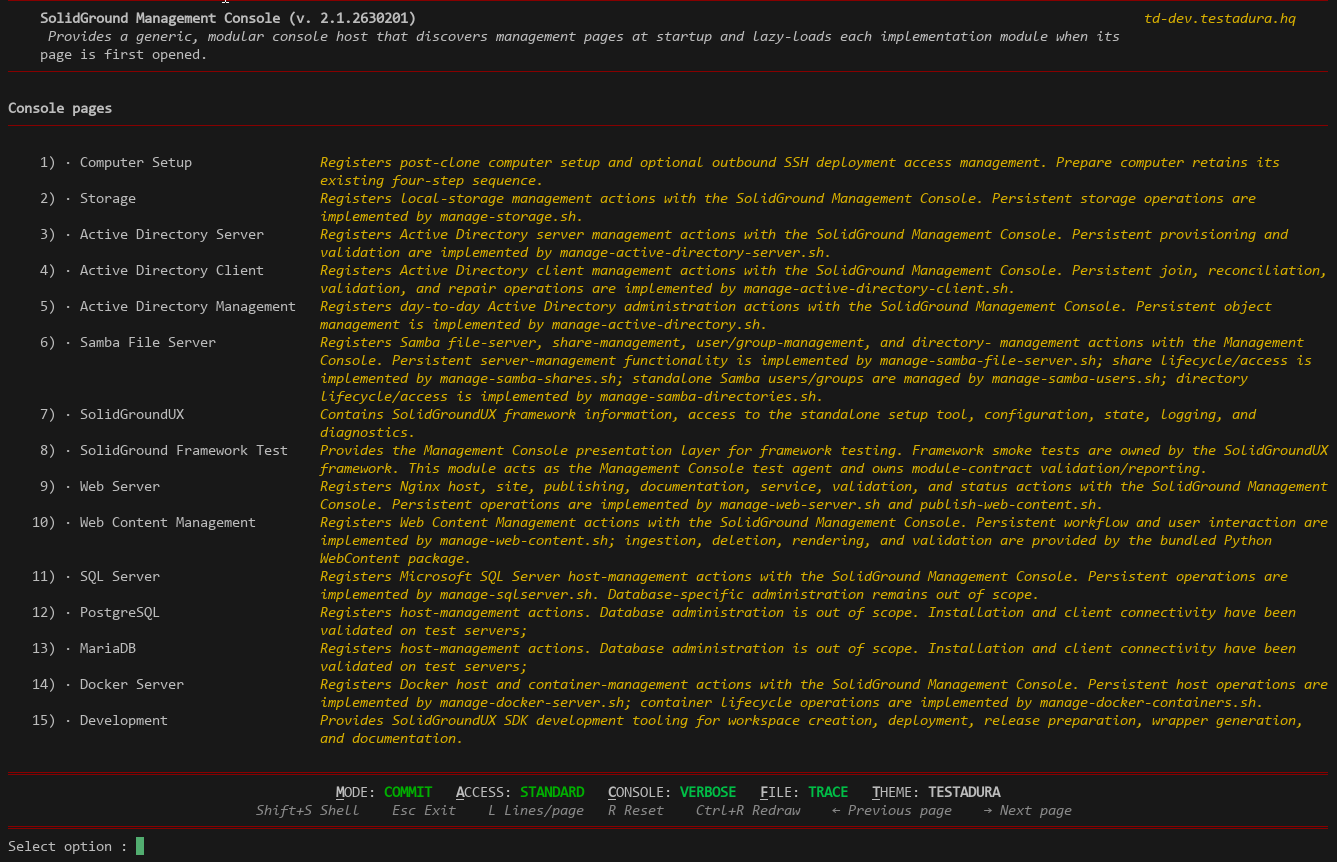
The SolidGround Management Console is the interactive administration host for MCM. It presents a lightweight index of functional pages, loads a page only when the operator opens it, and delegates menu rendering and dispatch to the Framework-owned
sgnd-menuAPI.
The result is one console application rather than a collection of unrelated nested menu scripts. Navigation, paging, status, execution mode, themes, logging controls, and other host behavior remain consistent while each module owns only its subject.
Architecture
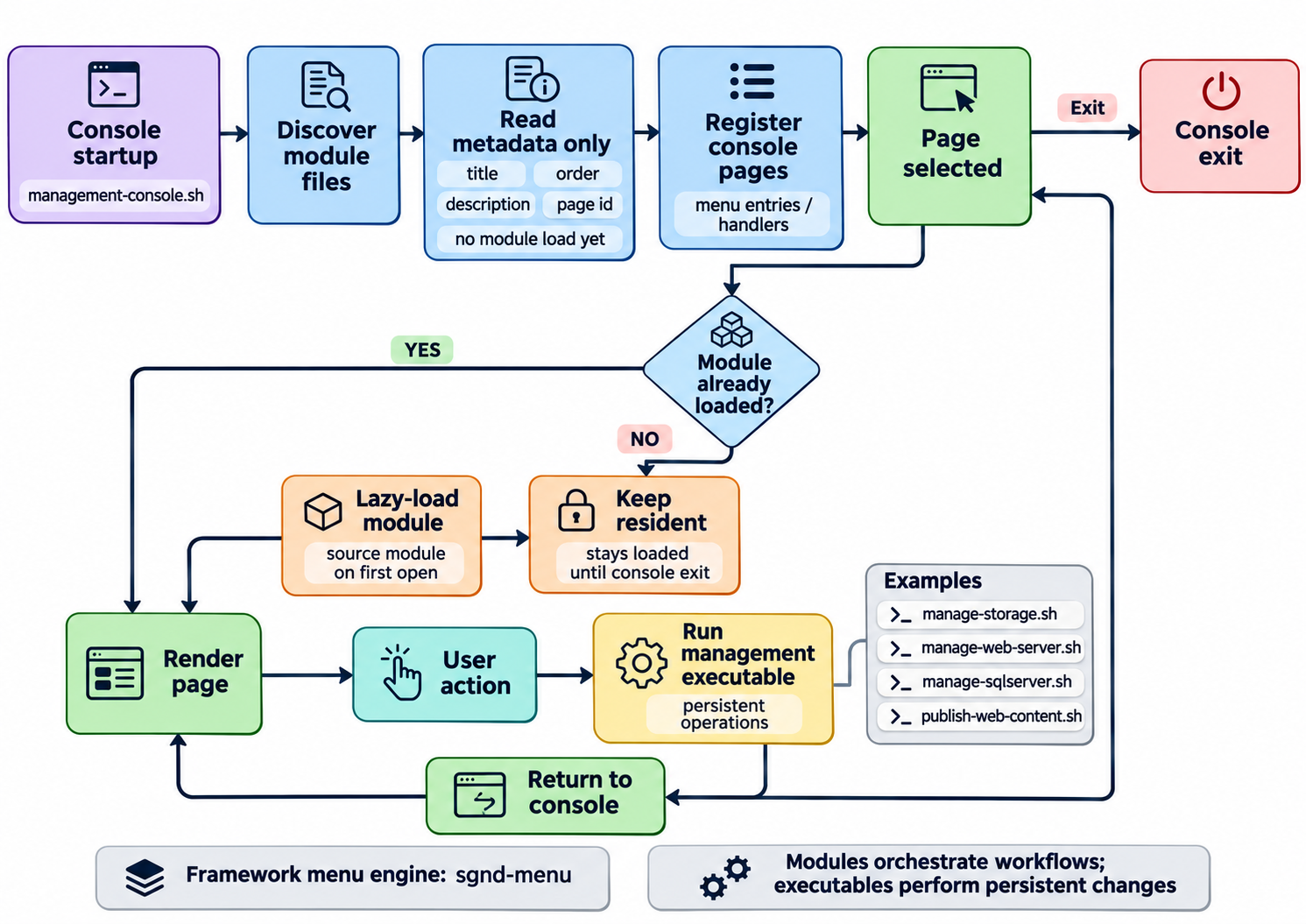
The main pieces are:
management-console.sh
    MCM-owned host behind the public `sgnd-console` command. It discovers pages,
    builds the index, lazy-loads selected modules, owns direct console controls,
    and runs the application lifecycle.

sgnd-menu.sh
    Framework-owned menu engine. It owns group/item registration, layout,
    numbering, paging, visibility, status decoration, input, and dispatch.

console-modules/*.sh
    Source-only MCM page definitions. Each module registers the operator-facing
    actions for one management subject.

role-manager executables
    Independently executable operational tools called by modules when persistent
    system-management work belongs outside the page definition.
Framework common libraries
    Reusable bootstrap, logging, UI, configuration/state, and shared APIs.
This ownership boundary is intentional: the console host owns application lifecycle,
sgnd-menuowns generic menu mechanics, modules own page orchestration, and role managers own reusable operational behavior.
Discovery and Lazy Loading
Startup discovers enabled module files and reads only enough literal/header metadata to build the main index. Module implementation code is not sourced merely to discover that a page exists.
Loading follows four rules:
1. Discover enabled module files at startup.
2. Do not source a module until its page is selected.
3. Source each module at most once per console process.
4. Keep a loaded module resident until the console exits.
Keeping an opened module loaded avoids repeated parsing and allows page-local state to survive while the operator moves between the index and previously used pages. Menu registrations from other loaded modules remain in the model but are filtered out when a different source page is active.
Main Index
The standard 2.1 module collection is:
Computer Setup
Storage
Active Directory Server
Active Directory Client
Active Directory Management
Samba File Server
SolidGroundUX
SolidGround Framework Test
Web Server
SQL Server
Docker Server
Development
Numeric filename prefixes define page order. Disabled modules are omitted from the index and are not sourced during that console run. Root sessions can manage page visibility from the index without loading the hidden modules first.
Navigation and Direct Controls
The console has two navigation levels: the main index and the active module page. Selecting a number on the index opens that page directly; Escape returns from a module page to the index. Left/Right navigation is available when a module spans multiple menu pages.
Host-owned direct controls expose runtime state and actions that should not be copied into individual modules. These include DRY-RUN/COMMIT mode, access context, console and file log levels, theme selection, shell access, lines per page, status reset, and terminal re-measure/redraw.
The direct-control model replaces the old idea of a Console Settings module. A functional page should not depend on another module being loaded merely to change framework-owned console state.
Module Boundary
A module is a source-only orchestration unit. It exposes literal page metadata for discovery and, when loaded, registers groups/items through the shared menu API. Functions referenced by registrations must already be defined, and the normal source-only guard keeps repeated sourcing harmless.
Modules must not depend on another lazy-loaded page having been opened first. Shared helpers belong in a commonly owned library. Persistent operational behavior belongs in role managers when it is useful outside the console page itself.
DRYRUN is part of the execution contract. A module delegating to another executable must propagate dry-run context so crossing an executable boundary cannot turn a preview into a real change.
The separate Module Registration and Role Managers documentation groups describe these two sides of the boundary in more detail.
Action Status and Post-Action Flow
Menu actions can record result state such as never, success, warning, or failed.
sgnd-menurenders the decoration while the host owns persistence/reset behavior. Status can be cleared for the current module without discarding results belonging to every other page.
Menu items may request a post-action viewing window. The console uses the shared auto-continue dialog so the operator can continue early or pause the countdown without changing the action result. Host-owned immediate controls redraw without that wait.
SolidGroundUX Lifecycle Integration
The SolidGroundUX page exposes framework information, configuration/state, logging, diagnostics, and product lifecycle entry points. Installation/update logic is not reimplemented in the console module: lifecycle actions delegate to the standalone
sgnd-setuptool.
Setup remains usable independently of the console so installation, repair, rollback, or removal does not depend on the Framework being healthy enough to start MCM.
Extending the Console
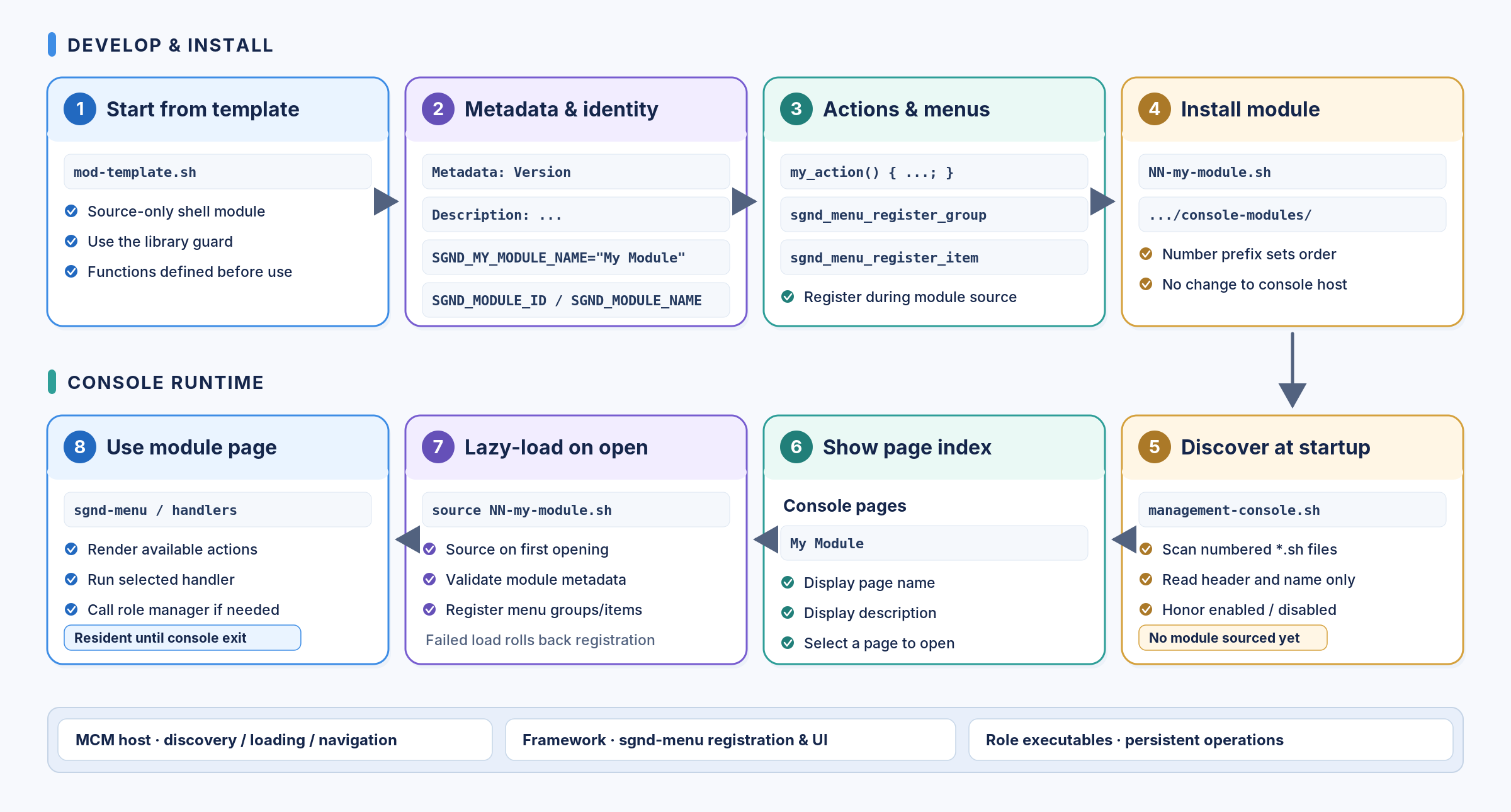
A normal new page does not require a change to
management-console.sh. Add a module following the canonical module contract and filename ordering convention; the next console start discovers its metadata and adds it to the index.
sgnd-console --appcfgcan also point at another module file or module directory so the same host/menu architecture can support a dedicated console application without copying the host implementation.
Why This Architecture Matters
The console is intentionally thin at the center. Discovery happens early, code loads only when needed, generic UI mechanics stay in the Framework, and operational tools remain reusable outside the console.
That makes the reader path mirror the software boundary: learn the Console host here, the page definitions under Module Registration, and the system-changing executables under Role Managers.